Three Tools for Brand Protection: Registrations, Certificates, and Lookalike Domains
A brand is rarely one domain. It is a main site, plus everything registered around it: names that other people register containing your brand, TLS certificates issued for hostnames that carry your name, and lookalike domains built to borrow a little of the recognition you created.
Most of that activity is hard to see from the inside. You know the domains you registered. You do not automatically know the name someone registered containing your brand last week, the certificate that just went live for a near-copy of your domain, or the typo variant sitting one keystroke away from your homepage. Protecting a brand online starts with being able to see all of it, the way anyone on the outside can.
This post walks through three tools that cover three different slices of your brand's presence across the domain and certificate landscape. Each answers one question, and together they give a brand owner a clear, outside-in view of how the brand actually appears.
1. Who just registered your brand: Search New
The first question is the one most brand teams want answered continuously: did anyone register a domain containing my brand recently? New registrations are where brand issues begin. A name registered this week is a signal worth seeing this week, not after it has been put to use.
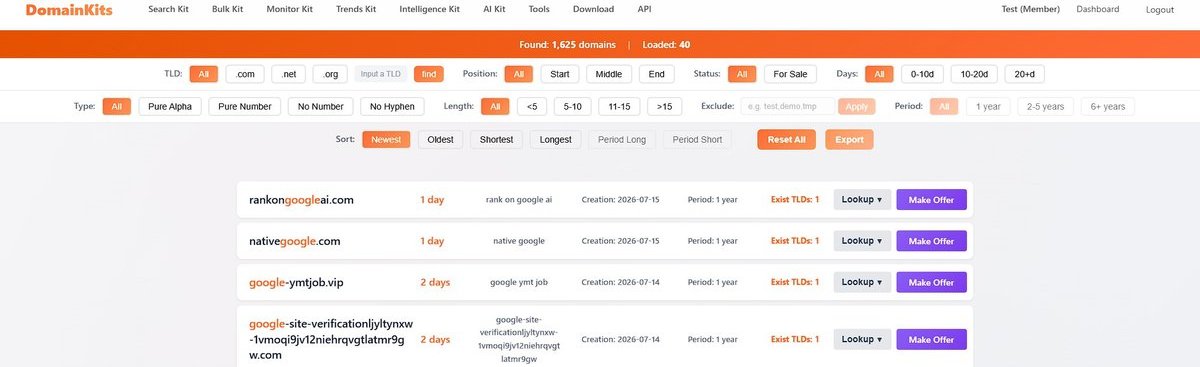
The DomainKits Search New tool holds the past 60 days of registrations across 1,000+ gTLDs in one searchable index, updated daily. Search your brand as a keyword and you get back every recently registered name that contains it, newest first, so a single query answers the question a daily download list makes you assemble by hand.
What makes it useful for brand work:
- The weekly brand check. Search your brand with no other filters, sorted by freshness. Two minutes replaces finding out when something has already gone live. Anything that looks off gets the follow-up treatment: WHOIS, DNS, and safety checks are one click away in the results.
- Position and noise control. Choose whether the keyword sits at the start, middle, or end of the name, and exclude terms you do not care about, so the results are the ones that actually resemble your brand rather than incidental matches.
- Cross-TLD registration count. Each result shows how many extensions the same name was registered across. A name claimed on several TLDs at once was claimed deliberately, and that intent is visible at a glance.
Registered members can export any filtered view, which turns a brand search into a list you can hand off or track over time.
2. Every certificate issued in your name: CTlogs.io
The second question moves from who registered a name to who put one online: what TLS certificates have been issued for hostnames carrying my brand, including ones I did not request?
This is possible because of Certificate Transparency. CT is an open framework created by Google and standardized as RFC 6962, and it requires certificate authorities to publish every TLS certificate they issue into public, append-only logs that anyone can audit. Chrome and Firefox enforce it for publicly-trusted certificates, which means in practice that if a site has a working HTTPS padlock, a record of its certificate exists in a log you can read.
CTlogs.io indexes those logs and makes them searchable. At the time of writing it covers roughly 16.6 billion certificates across 407 million unique domains, sourced from the CT logs operated by organizations such as Google, Cloudflare, DigiCert, and Let's Encrypt, and ingested continuously as new certificates appear.
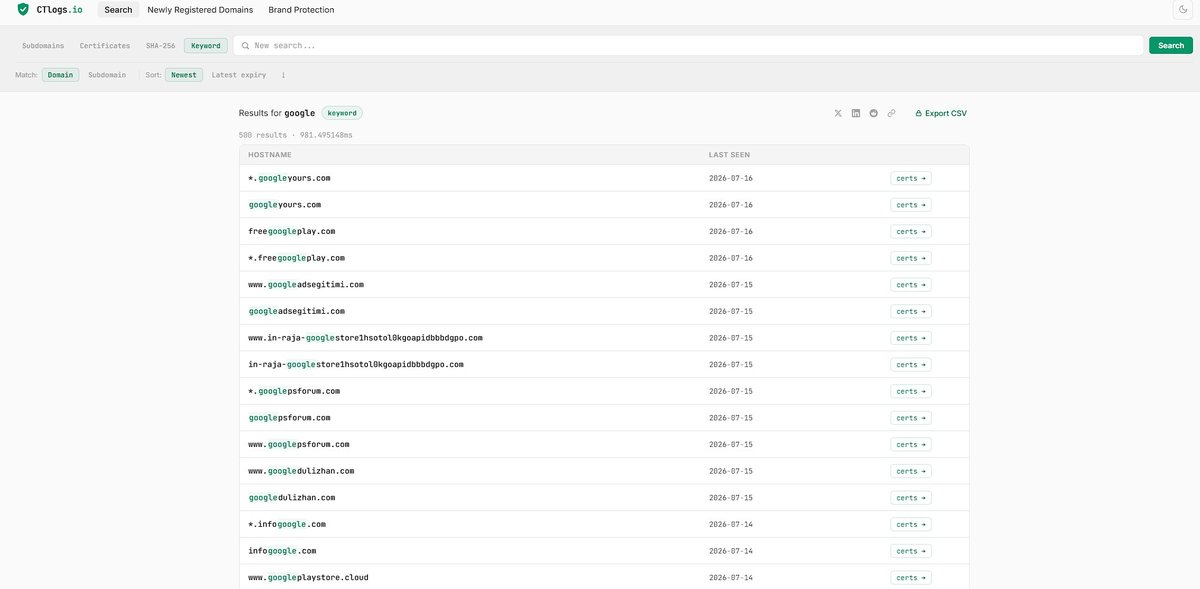
It offers four ways in:
- Subdomains. Lists subdomains seen for a registered domain, drawn from certificate records.
- Certificates. Returns the certificate records for an exact hostname.
- SHA-256. Looks up a specific certificate by its fingerprint.
- Keyword. Runs a fuzzy match across hostnames, so a search for your brand name surfaces every certificate ever issued for a hostname that contains it.
That last mode is the brand-protection workhorse. Here is the logic: when someone registers a lookalike domain and puts a real page behind it, they typically obtain an HTTPS certificate for it, because a browser warning on an insecure page turns visitors away. The moment they get that certificate, it is recorded in a public CT log. A keyword search for your brand, your trademarks, or your product names surfaces those matching hostnames early, so you learn about a lookalike while its certificate is fresh rather than long after the fact.
Two practical notes from its documentation: searches focus on currently valid certificates by default, since that reflects what is actually deployed and reachable today, and keyword search currently covers generic TLDs, with country-code extensions such as .cn, .de, and .ru not yet included.
3. The lookalikes around your brand: the Typosquat Scanner
The third question is preventive rather than reactive: which near-copies of my domain are easy to register, and which ones has someone already taken?
The DomainKits Typosquat Scanner takes your domain and generates variations of it across 11 mutation types, the patterns that lookalike registrations tend to follow:
- Keyboard and typo patterns: character omission (
goole.com), transposition (googel.com), keyboard-adjacent replacement (gpogle.com), insertion, repetition, and hyphenation. - Visual and linguistic patterns: homoglyph substitution (
g00gle.com), vowel swaps, and plural or singular forms. - Extension patterns: your exact name checked on key extensions such as .ai, .io, and .app, plus common TLD swaps across .com, .net, .org, and others.
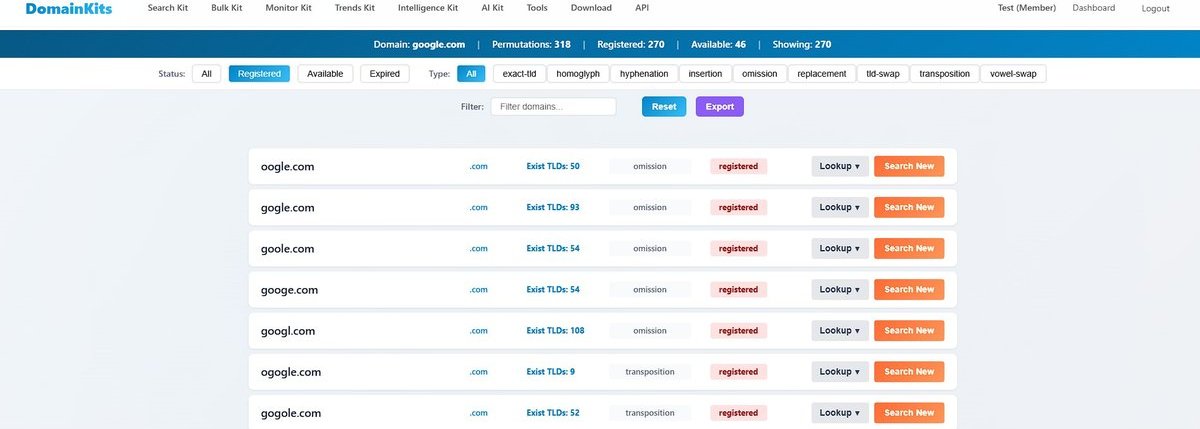
For each variation, the scanner checks registration status and streams the results back. By default it shows the registered lookalikes first, because those are the ones that already exist and may warrant a closer look, and each result also reports how many extensions that same name is registered across, a quick signal of whether a name was claimed deliberately and at scale.
From any registered result, follow-up is one click away. A Lookup menu runs WHOIS, DNS, and safety checks on the lookalike, and a Search New shortcut pushes the name's prefix into newly registered domain search to see what else recently appeared around it. Registered members can export the full set.
The point of the scan is not to register every permutation, which no brand does. It is to prioritize. The highest-risk variants, single-character typos of your exact name, homoglyph copies, and your exact name on major extensions, are the ones worth securing defensively while they are still available, and securing a name early is typically far cheaper than recovering it after someone else builds on it.
How the three fit together
Used on their own, each tool answers its own question. Used together, they track your brand across three stages of the same story:
- Search New catches registrations as they happen. A name containing your brand shows up here first, often before it has been put to any use, which makes it the earliest signal you can act on.
- CTlogs.io keyword search shows what has gone live. A name that has obtained a certificate is past the planning stage and is likely serving a real page, so certificate data confirms which registrations turned into active sites.
- The Typosquat Scanner maps what could still be claimed. It lays out the space of names someone might register around your brand, and flags which are already taken, so you can secure the highest-risk ones first.
A reasonable routine looks like this. Search your brand as a keyword on Search New weekly to catch new registrations while they are fresh. Search the same brand on CTlogs.io periodically to see which names have obtained certificates and gone live. And run the Typosquat Scanner once to understand the shape of your lookalike landscape and register the highest-priority names before someone else does.
None of this requires a dedicated team or a data pipeline. Each tool is a search box. The work is in asking the three questions in the first place, and most brands do not, until something has already gone wrong.
Start with whichever question is most pressing: see who just registered your brand, search the certificate logs for your brand, or scan your domain for lookalikes.
For automated, continuous brand monitoring across new registrations and certificate data, see BrandArgus, built for exactly this kind of ongoing watch.
Get new articles by email
No account needed. At most one email a day, only when there is something new.
We use your email only to send new articles. Every email has a one-click unsubscribe link. Privacy policy