How Do I Add a List of Newly Registered Domains to Pi-hole?
Table of contents
Pi-hole cannot look up when a domain was registered, so blocking newly registered domains takes a list of them. DomainKits publishes that list daily, free for members, as a plain file of domain names that Pi-hole can read. The steps below download it, add it to Pi-hole and keep it current.
Where can I download a list of newly registered domains?
On the DomainKits download page. Create a free account, sign in and download the day's Domain-Only List. It is a .txt.gz file that unzips to one domain per line, ready for blocklists, and it covers newly registered gTLD domains.
With an API key from your dashboard, one curl command fetches the same file through the DomainKits API:
curl -fsSL -H "Authorization: Bearer dk_xxx" \
  "https://premium-api.domainkits.com/api/v1/nrds/download?type=domains_only" -o nrd.txt.gz
On 64-bit systems, the dk command-line tool does the same with dk download type=domains_only -o nrd.txt.gz, reading the key from the DOMAINKITS_API_KEY environment variable.
I have a list of domains in a text file. How do I add it to Pi-hole?
Pi-hole reads a local file through a file:// address, as long as the pihole user can read the file. It matches a plain domain exactly, so a line with example.com does not block www.example.com. Written as ||example.com^, a line blocks the domain and its subdomains. Unzip the download, convert each line and save the result:
gunzip -c nrd.txt.gz | sed -e '/^$/d' -e 's/.*/||&^/' | sudo tee /etc/pihole/nrd.txt > /dev/null
sudo chmod 644 /etc/pihole/nrd.txt
sed turns each domain into a ||domain^ line.
In the Pi-hole web interface, open Lists, enter file:///etc/pihole/nrd.txt as the Address and click Add blocklist. Then open Tools > Update Gravity and click Update, or run sudo pihole -g. Pi-hole blocks from a new list once Gravity has run, and its output reports the lines as ABP-style domains.
In Docker, keep the file in a volume mapped into the container and use the path inside the container in the address.
To check, look up the www name of a domain from the file through Pi-hole. On the Pi-hole device, with example.com replaced by that domain:
dig +short www.example.com @127.0.0.1With the default blocking mode the answer is 0.0.0.0, and the Query Log shows the query as Blocked (gravity).
How do I update it every day?
Pi-hole updates its lists once a week by default, while a DomainKits file holds one day of registrations. A daily job keeps a rolling list: each run adds the newest day, drops the oldest and updates Gravity.
#!/bin/sh
PATH=/usr/local/sbin:/usr/local/bin:/usr/sbin:/usr/bin:/sbin:/bin
DOMAINKITS_API_KEY=dk_xxx
DAYS=7
DIR=/etc/pihole/nrd
URL="https://premium-api.domainkits.com/api/v1/nrds/download?type=domains_only"

mkdir -p "$DIR"
curl -fsSL -H "Authorization: Bearer $DOMAINKITS_API_KEY" "$URL" -o /tmp/nrd.txt.gz \
  && gunzip -f /tmp/nrd.txt.gz \
  && sed -e '/^$/d' -e 's/.*/||&^/' /tmp/nrd.txt > "$DIR/$(date +%Y-%m-%d).txt" \
  && ls -r "$DIR"/*.txt | tail -n +$((DAYS + 1)) | xargs rm -f \
  && cat "$DIR"/*.txt > /etc/pihole/nrd.txt.new \
  && chmod 644 /etc/pihole/nrd.txt.new \
  && mv /etc/pihole/nrd.txt.new /etc/pihole/nrd.txt \
  && pihole -g
rm -f /tmp/nrd.txt /tmp/nrd.txt.gz
Each day's list is saved in /etc/pihole/nrd/ under its date. DAYS sets how many of these daily files the script keeps: it deletes older ones and joins the rest into /etc/pihole/nrd.txt, the file Pi-hole reads. DAYS=7 keeps seven days, and DAYS=10 keeps ten.
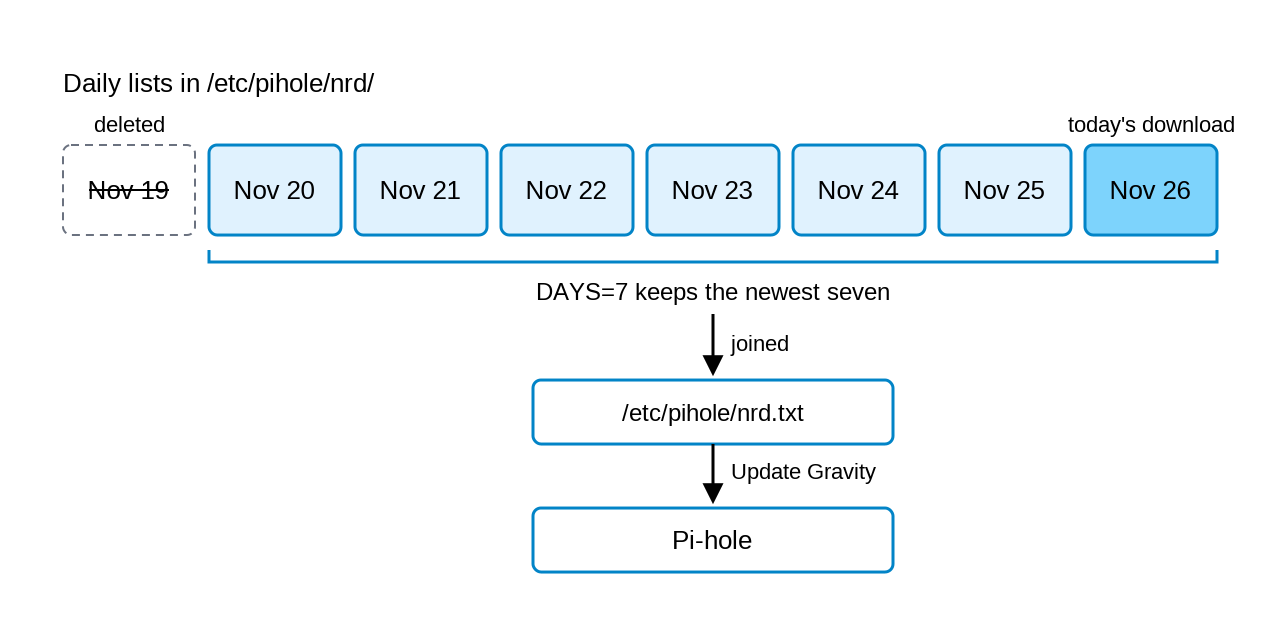
Save it as /usr/local/bin/update-nrd.sh with your API key in place of dk_xxx, then run sudo chmod 700 /usr/local/bin/update-nrd.sh so that other users cannot read the key. Add it to root's crontab with sudo crontab -e. The download area usually updates between 08:00 and 10:00 UTC, and cron runs on the device's local time, so pick a local time after 10:00 UTC. On a device set to UTC:
30 10 * * * /usr/local/bin/update-nrd.shThe script sets its own PATH because cron typically starts jobs with /usr/bin:/bin, which leaves out /usr/local/bin, where pihole is installed. It writes the new list beside the old one and moves it into place once the download and conversion succeed, so a failed download leaves the previous list in use. It uses curl and standard shell tools, so it also runs on 32-bit systems, where dk does not: dk has Linux builds for amd64 and arm64.
A site I need broke after I added the list. What now?
A list of new domains also holds new legitimate sites, so expect some to be blocked by mistake. Add the domain to Pi-hole's allowlist under Domains, or run pihole allow example.com www.example.com. An allowlist entry covers one exact name, so list each name the site uses. Exact allowlist entries take priority over subscribed blocklists.
- The commands and the daily script above were tested on 26 November 2026 with a free DomainKits account and Pi-hole v6 (Core v6.6, FTL v6.9, web interface v6.6.1) in its Docker image for 64-bit and 32-bit ARM. That day's file held 342,010 domains. Update times are as stated on the DomainKits download page.
Get new articles by email
No account needed. At most one email a day, only when there is something new.
We use your email only to send new articles. Every email has a one-click unsubscribe link. Privacy policy