Hostname Search: Find Hostnames by Keyword, Subdomains Included
A suspicious hostname does not need to put your brand in the registered domain. It could look like yourbrand-login.unrelated-host.com. Search registration records for your brand and nothing comes back, because the registered domain is simply unrelated-host.com.
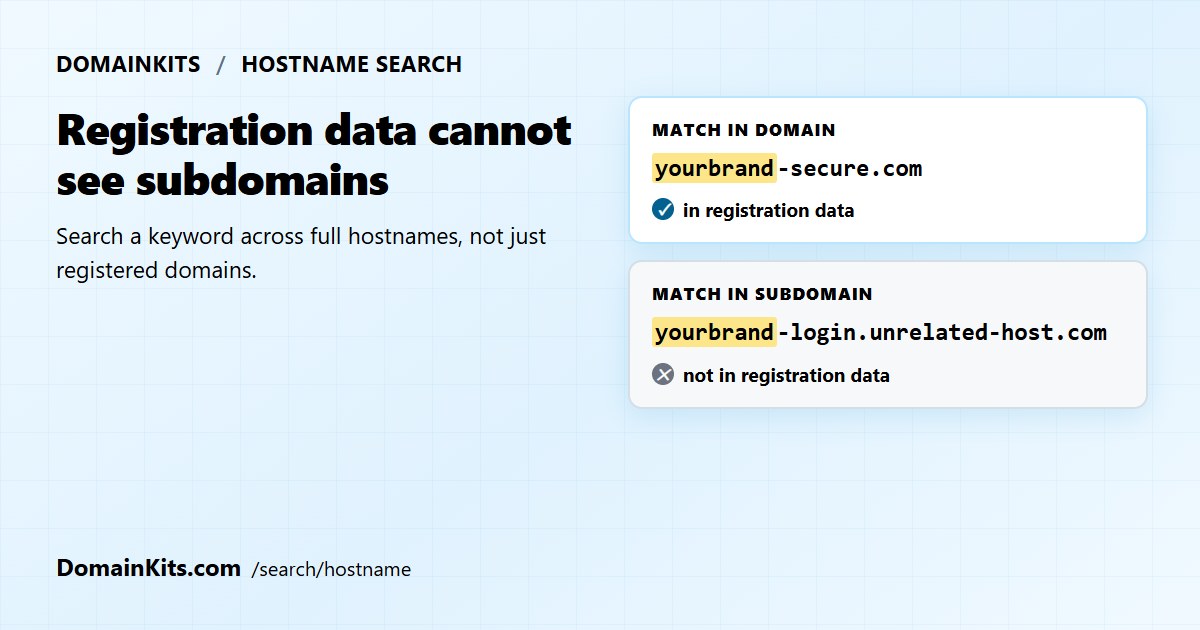
Hostname Search is built for that blind spot. Instead of starting with a domain you already know, it starts with a word and looks for that word in recently observed hostnames, including the part before the registered domain.
Hostname, subdomain, domain
These terms are often mixed together, but the distinction is the whole reason this search exists.
- Registered domain:
example.com. This is the name managed through a registrar and covered by registration data such as registrar and expiry details. - Subdomain:
shop.example.com. The operator ofexample.comcreates it without making a separate registry-level registration. - Hostname: the complete name, such as
shop.example.com, that can be associated with a host or service.
Registration records stop at the registered domain. They can tell you about example.com, but they do not contain a list of names created beneath it. So a monitor based only on domain registrations will miss a brand name that appears solely in a subdomain.
What the page does
Enter a keyword and the page returns matching hostnames, newest observations first. Each row shows when the name was last seen in the underlying dataset. That timestamp is useful for sorting fresh leads; it is not a live uptime check.
You can narrow the feed in four ways:
- Where the keyword appears. Domain matching finds a name such as
yourbrand-secure.com. Subdomain matching findsyourbrand-secure.unrelated-host.com. The second case is the one registration monitoring cannot see. - TLD. Choose an extension from the shortcuts or enter one yourself. Searches cover one extension at a time.
- Country-code extensions. Include or exclude them with a separate control, available on the Advanced plan and above.
- Time window. Look back 15 minutes, 1 hour, 6 hours, 12 hours or 24 hours. The default and maximum window is 24 hours.
The 24-hour limit makes this a discovery feed, not a historical inventory. It is useful when the question is “What has shown up recently?” If you need every known subdomain under a domain, use a subdomain enumeration tool instead.
A practical brand check
For a quick brand-protection pass, start with a 24-hour search and match the brand in the subdomain. Review the registered domain underneath each result: an unfamiliar parent domain, especially one paired with words such as login, verify or support, deserves a closer look.
Then run the same keyword against the domain portion. That catches recently observed names such as yourbrand-secure.com, which belong to the registration side of the problem.
A match is a lead, not a verdict. Before treating it as abuse, check whether the hostname resolves, inspect its certificate and web content, and rule out services used by your own company or an authorised vendor. The parent domain can then be investigated with WHOIS or RDAP data, while a subdomain finder can show what else exists under it.
What it is not
Hostname Search overlaps with a couple of familiar tools, but the starting question is different.
A subdomain enumeration tool starts with a known domain and looks beneath it. The DomainKits Subdomain Finder, for example, can investigate example.com. Hostname Search works in the opposite direction: you know the word, but not the domain that may be using it.
A certificate lookup takes a known name and returns its certificate history. CTlogs.io is useful once Hostname Search has surfaced something worth investigating.
In practice, one tool finds the lead and the others add context. Use Hostname Search to discover a name, certificate or subdomain tools to investigate it, and a WHOIS lookup to check the registered domain beneath it.
When to use it
Brand protection. Search the subdomain and domain portions separately. The two searches catch different kinds of naming, and together provide a better starting point than registration monitoring alone.
Security research. Watch for recently logged certificate names containing terms such as admin, API, staging or login alongside a product or technology name. Short time windows help when recent observations matter.
Naming research. See how a word is being used across recent certificate names before choosing it for a product, project or domain.
Market research. Pair a category term with an extension to spot recent naming patterns. Treat the results as examples rather than a complete picture of the market.
What the data can and cannot tell you
The feed is derived from public Certificate Transparency records, the same source used by CTlogs.io. A hostname becomes visible when a certificate or precertificate containing that name is recorded in a public CT log. This can happen before the host is reachable, and it does not prove that a website or service was launched at that time.
Coverage is broad, but not complete. Hosts without publicly logged certificates will not appear. Private certificates are outside the dataset, and a wildcard certificate such as *.example.com may reveal the wildcard without revealing every hostname that uses it. No result should therefore be read as proof that a hostname does not exist.
The observation time is also not a live status. A listed name may no longer resolve, may have been repointed, or may never have served public content. Validate interesting results before acting on them.
The search does not identify the person or organisation behind a name. It returns hostnames, extensions and observation times. Ownership and intent require separate investigation.
Access
Hostname Search requires an account, and the free plan is enough to try it. Paid plans increase the number of results, unlock additional filters and reduce the delay before new observations become available. Country-code extensions are available from the Advanced plan upward.
Search a keyword in recent hostnames, or compare the available plans.
Related reading: for the registration-data side of the same problem, see three tools for brand protection and the typosquatting detection guide.
Get new articles by email
No account needed. At most one email a day, only when there is something new.
We use your email only to send new articles. Every email has a one-click unsubscribe link. Privacy policy