Domain Monitor: Automated WHOIS and DNS Change Tracking for Your Domains
A domain's nameservers change at 2 PM. A daily monitor catches it the next morning. An hourly monitor catches it by 3 PM. That difference matters: a registrar transfer, an EPP status flipping to clientHold, or a DNS record pointing somewhere unexpected are the kinds of changes where hours count, not days.
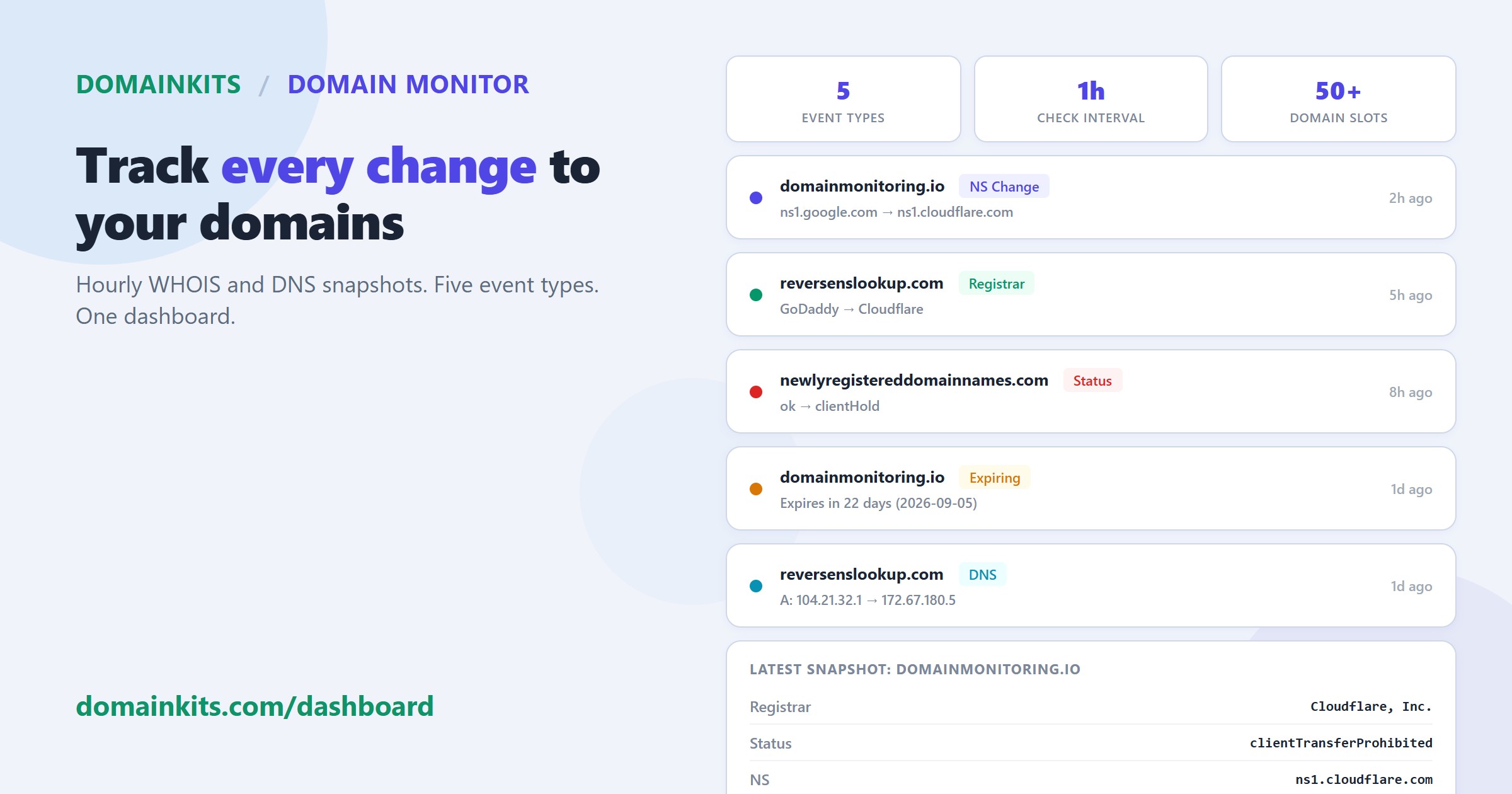
DomainKits Domain Monitor checks every domain on your list once per hour. Each check takes a full snapshot of the domain's WHOIS and DNS state, compares it against the previous snapshot, and flags any difference. Changes appear in a feed on your dashboard with unread indicators, so you see what changed since your last visit, typically within an hour of when it happened.
What it tracks
Every hour, the monitor captures a full snapshot of the domain's current state:
- Registrar: Which ICANN-accredited registrar the domain is registered through.
- EPP status codes: The domain's registration status flags (clientTransferProhibited, serverHold, pendingDelete, etc.).
- Name servers: The authoritative DNS servers the domain points to.
- DNS records: A records (IPv4), MX records (mail routing), and CNAME records.
- Expiration date: When the domain registration expires.
The snapshot is stored and compared against the previous one. When a field changes, the monitor generates an event with the old value and the new value.
Five event types
The monitor detects five categories of change. Each event in the dashboard shows the domain name, the event type, the old and new values, and when the change was detected.
Registrar Change
The domain has been transferred to a different registrar. The event shows the previous registrar name and the new one. A registrar change is one of the most significant signals for a domain: it usually means the domain changed hands (sale, acquisition, or portfolio consolidation), or the owner moved it to a different provider. Either way, the domain's management context has shifted.
NS Change
The domain's authoritative nameservers have changed. The event shows the old nameserver hostnames and the new ones. A nameserver change typically means the domain's DNS hosting moved, the website migrated to a different platform, or a CDN was added or removed. In some cases, nameservers switching to a marketplace parking service (e.g., ns1.sedoparking.com, ns1.dan.com) signals that the domain has been listed for sale.
DNS Change
An A record, MX record, or CNAME record has changed. The event specifies which record type changed and shows the old and new values. An A record change means the domain now points to a different server. An MX record change means mail routing has been reconfigured. A CNAME change means a subdomain alias has been added, removed, or redirected.
Status Change
One or more EPP status codes have changed. The event shows the previous status set and the new one. EPP statuses control what operations are allowed on a domain: clientTransferProhibited prevents transfers, clientHold takes the domain offline, serverDeleteProhibited protects against accidental deletion. A status changing to any "hold" state is typically urgent, as it means the domain may stop resolving.
Expiring Soon
The domain's expiration date is less than 30 days away. The dashboard shows the domain with an "Expiring" status indicator and the expiration date highlighted. This is not a reactive change detection but a proactive warning: the domain is approaching its renewal deadline.
The dashboard
The Domain Monitor dashboard has three sections.
Quota display. Shows how many of your monitoring slots are in use (e.g., "3 / 50"). The quota bar fills as you add domains.
Recent Changes. A chronological feed of detected events across all your monitored domains. Each entry shows the domain name, event type badge (NS Change, Registrar Change, Status Change, Expiring Soon, DNS Change), the old and new values, and the time since detection. Unread events have a dot indicator that clears when you view the dashboard.
Monitored Domains table. Lists every domain you are monitoring with its current state:
- Status: Active (normal), Expiring (within 30 days), Hold (if any EPP hold status is present), or Pending check (newly added, first snapshot not yet taken).
- Registrar: Current registrar name.
- Name Servers: Primary nameserver hostname.
- DNS: A, CNAME, and MX records with counts when multiple records exist.
- Expires: Registration expiration date, highlighted when within 30 days.
- Last Checked: How long ago the most recent hourly check ran.
Adding domains
Enter one domain per line in the Add Domains form. The monitor accepts any valid domain name, including internationalized domain names (IDN). Newly added domains get their first snapshot within minutes and enter the hourly check cycle immediately.
To stop monitoring a domain, click the remove button in the Monitored Domains table. Removing a domain clears its snapshots and event history.
Plan limits
| Plan | Monitored domains |
|---|---|
| Free | 3 |
| Lite | 10 |
| Premium | 50 |
| Platinum | Unlimited |
All plans run hourly checks with the same five event types. The only difference is the number of domains you can monitor simultaneously.
Get started
Domain Monitor is available in your dashboard. Add your first domain, and the initial snapshot arrives within minutes.