Automate Brand Domain Monitoring with n8n: NRD Alerts + Typosquat Scanning
Run a DomainKits typosquat scan on finance.com. The result: 357 permutation variants, and the majority are already registered. fiance.com (omission, registered on 36 TLDs since 1998). finace.com (omission, 31 TLDs since 2003). financ.com (omission, 45 TLDs since 2004). vinance.com (replacement, 28 TLDs since 2000). f1nance.com (homoglyph, 14 TLDs). The prefix "finance" appears on 425 TLD extensions. And the insertion variants tell their own story: finances.com is registered on 152 TLDs since 1995, financer.com on 82 TLDs, ifinance.com on 71 TLDs since 1996.
A keyword search for "finance" in newly registered domain data catches the direct matches: domains containing the exact word. But it misses every one of those 357 variants, because the point of a typosquat is that it does not contain the exact target string. fiance.com looks like a typo for "fiance" (the person), not "finance" (the industry), yet it is one character away and on 36 TLDs. f1nance.com with a digit replacing the letter i is visually identical in many fonts. Catching both threat surfaces requires two different tools in the same workflow.
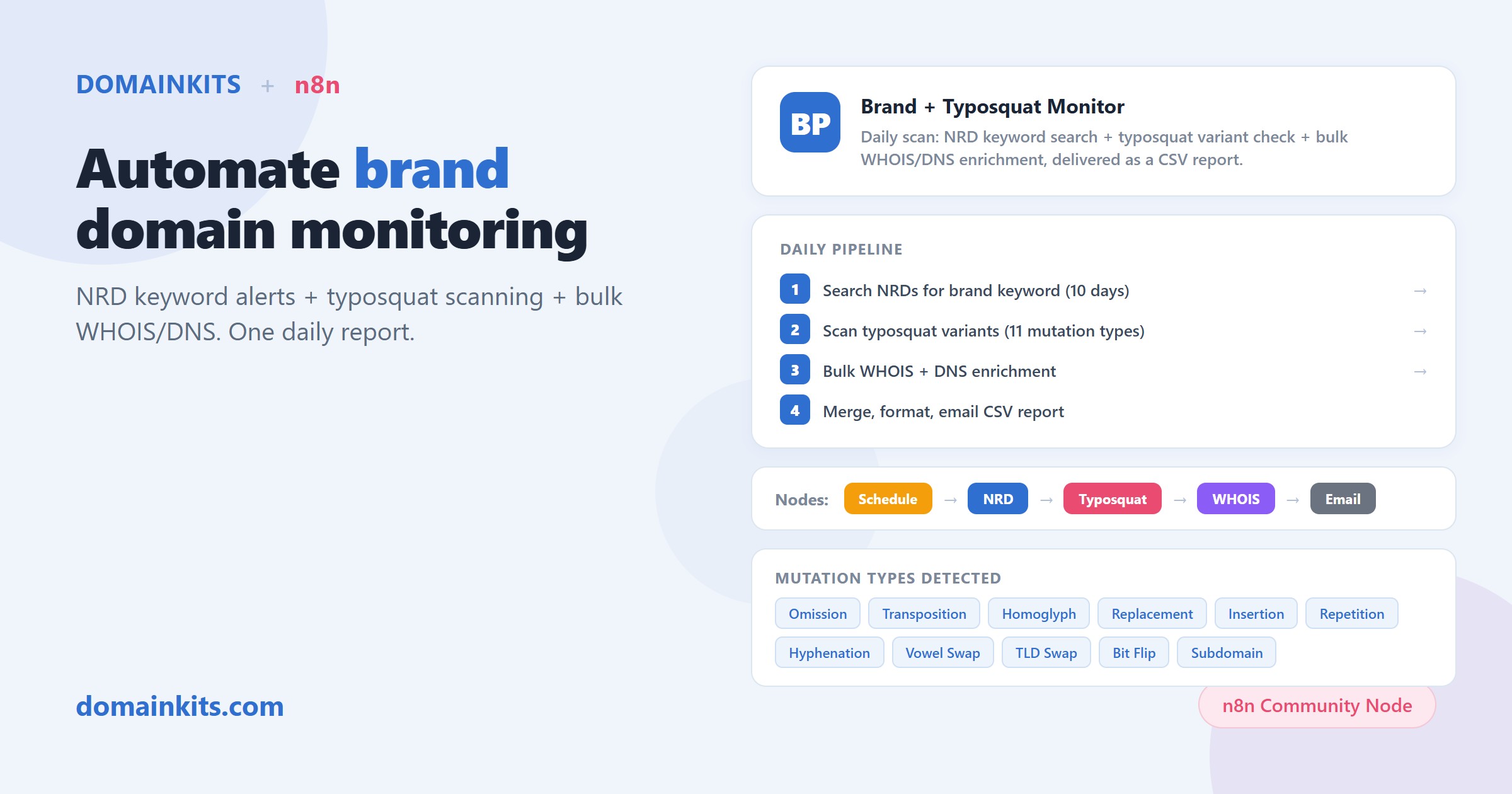
That is what this template does. It runs daily on n8n with the DomainKits community node, combining NRD keyword alerts with typosquat variant scanning, then enriching every discovered domain with bulk WHOIS and DNS data before delivering a CSV report.
Brand monitoring is NRD monitoring with a focused lens
In Automate NRD Alerts with n8n, we covered how to track newly registered domains by keyword. That workflow answers "what domains containing this word were registered recently?" For broad keywords like "cloud" (2,031 new .com registrations in 10 days) or "agent" (7,110 across all TLDs in the same window), the daily digest is a market intelligence tool.
Brand monitoring narrows that same pipeline to a single target: your brand name. The NRD volume is typically much lower (a specific brand generates fewer daily registrations than a generic keyword), but the signal is higher. Every match is potentially adversarial: phishing, affiliate fraud, trademark infringement, or competitive positioning.
The difference is the second layer. Generic keyword monitoring stops at "domains containing this word." Brand monitoring adds typosquat scanning: generating every plausible mutation of your domain and checking which ones are registered. The finance.com scan above found 357 variants across 8 mutation types, many registered decades ago, that a keyword search for "finance" would never surface.
What the typosquat scanner finds
The DomainKits typosquat scanner generates permutations across 11 mutation types. Using finance.com as an example of what each type catches:
- Omission (7 variants, all registered): fiance.com (36 TLDs, since 1998), finace.com (31 TLDs, since 2003), financ.com (45 TLDs, since 2004), fnance.com, inance.com, finnce.com, finane.com. Every single-character deletion of "finance" is taken.
- Transposition (6 variants, 3 registered): finnace.com, finacne.com, finanec.com. Adjacent characters swapped. These are the domains people reach by mistyping quickly.
- Replacement (30+ variants generated): vinance.com (28 TLDs, since 2000), funance.com (17 TLDs, since 1999), dinance.com (10 TLDs), financr.com (11 TLDs), financs.com (6 TLDs). Each replaces one character with a keyboard-adjacent or phonetically similar alternative.
- Insertion (200+ variants, majority registered): finances.com (152 TLDs, since 1995), financer.com (82 TLDs), ifinance.com (71 TLDs, since 1996), efinance.com (58 TLDs, since 1998), financ.com (45 TLDs). An extra character at each position. The cross-TLD counts here show serious commercial value in the insertion space.
- Homoglyph (5 registered): f1nance.com (14 TLDs), flnance.com (15 TLDs, lowercase L for i), fin4nce.com, finanke.com, financ3.com. Visually identical in many fonts. The most dangerous variant type for phishing.
- Hyphenation (5 registered): fi-nance.com (4 TLDs), fin-ance.com, finan-ce.com. Hyphens inserted between characters.
- Vowel swap (10 registered): financa.com (35 TLDs, since 1996), financo.com (33 TLDs, since 1996), financi.com (32 TLDs). Vowels substituted for neighboring vowels. These cross-TLD counts rival the original domain.
- TLD swap (12+ registered): finance.net (since 1998), finance.org (since 1997), finance.io, finance.co, finance.app, finance.dev. The exact prefix on a different extension. "finance" is registered on 425 TLD extensions total.
Each variant includes the registration date and cross-TLD count, so you can distinguish a defensively registered domain from a recently registered one. For a deeper breakdown of all 11 mutation types, see Typosquatting Detection: 11 Domain Permutation Types.
Prerequisites
- An n8n instance. Self-hosted or n8n Cloud, v2.31+ (community node support).
- The DomainKits node. Install from Settings → Community Nodes → search for
n8n-nodes-domainkits. Self-hosted:npm install n8n-nodes-domainkits. - A DomainKits API key. API access requires a Premium or higher plan. Generate your key at domainkits.com/dev.
- SMTP credentials. The workflow delivers results via email with a CSV attachment.
How the workflow works
- Schedule trigger: Fires daily at 14:00 UTC.
- Configuration: Reads your brand domain from a settings node.
- NRD search: Queries DomainKits for newly registered domains from the past 10 days containing your brand keyword. This is the same NRD search from the NRD monitoring workflow, focused on your brand name.
- Typosquat scan: Runs the DomainKits typosquat scanner on your domain, returning all registered variants with their mutation type, registration date, and cross-TLD count.
- Merge: Combines both result sets into a single list.
- Bulk WHOIS: Sends all discovered domains to the DomainKits bulk WHOIS endpoint in batch mode (not one call per domain), retrieving registrar, creation date, and expiry date.
- Bulk DNS: Sends all domains to the bulk DNS endpoint, retrieving A, MX, and NS records.
- Format and email: Merges WHOIS and DNS data with the original findings, builds a summary, converts to CSV, and emails the report.
What the report tells you
The daily CSV contains one row per domain with:
- Domain name and source (NRD keyword match or typosquat variant)
- Mutation type and cross-TLD count (for typosquat variants)
- Registrar and creation date (from WHOIS)
- A records, MX records, nameservers (from DNS)
The WHOIS and DNS enrichment is what separates a raw alert from an actionable report. A typosquat variant pointing to a shared hosting IP with no MX records is likely parked. A variant pointing to a dedicated IP with MX records and a fresh SSL certificate is being actively deployed. The enrichment data makes that distinction without manual lookups.
The cross-TLD count adds another signal: financa.com registered on 35 TLDs is a different category of activity than a variant on a single extension. These numbers come directly from the DomainKits index, which tracks registration status across 1,200+ gTLD extensions.
How this relates to NRD monitoring
If you already run the daily NRD keyword alert, this workflow extends it with the typosquat layer. The two complement each other:
- NRD keyword alerts catch new domains containing your exact brand name. These are direct matches: "yourbrand-login.com," "myyourbrand.net." The alert fires when a new registration appears.
- This brand monitoring workflow catches both the direct matches (via the same NRD search) and the typosquat variants (via the permutation scanner). The typosquat scanner checks the full variant space, not just new registrations, so it catches variants that were registered months or years ago.
For most organizations: run the NRD keyword alert for broad awareness with Certificate Transparency correlation (catching the "registered + deployed" intersection), and this brand monitoring workflow for the typosquat dimension that keyword searches cannot reach.
Setup
- Your brand domain. Set it in the configuration node. The workflow extracts the keyword for NRD search and uses the full domain for typosquat scanning.
- SMTP credentials. Configure your email provider in the Email Send node.
Run manually once to verify the output format. The first automated report arrives at the next 14:00 UTC run.
Import this template on n8n.io
Customization ideas
- Multiple brands. Duplicate the workflow for each brand or product name.
- Add certificate tracking. Combine with Workflow 2 from the NRD article (Domain + Certificate Monitor) for your brand keyword, catching both registration and certificate issuance.
- Severity routing. Add a code node that scores findings by cross-TLD count and recency, routing high-severity items to a different channel.
- Google Sheets logging. Append daily findings to a spreadsheet for historical tracking of brand-related registration activity.
Get started
Related reading: Automate NRD Alerts with n8n covers the general-purpose NRD monitoring workflows that this article builds on. Automate Expired Domain Hunting with n8n covers expired domain prospecting with Moz enrichment.