Automate Newly Registered Domain Alerts with n8n: 2 Ready-Made Workflows
Search DomainKits for "pay" on .com, filtered to the past 10 days. The result: 3,065 newly registered domains. Search "cloud" on .com, same window: 2,031 domains. Search "agent" across all TLDs: 7,110 domains. That is ten days of registration activity for three keywords. If you are checking these manually, you are either spending hours every morning or missing things.
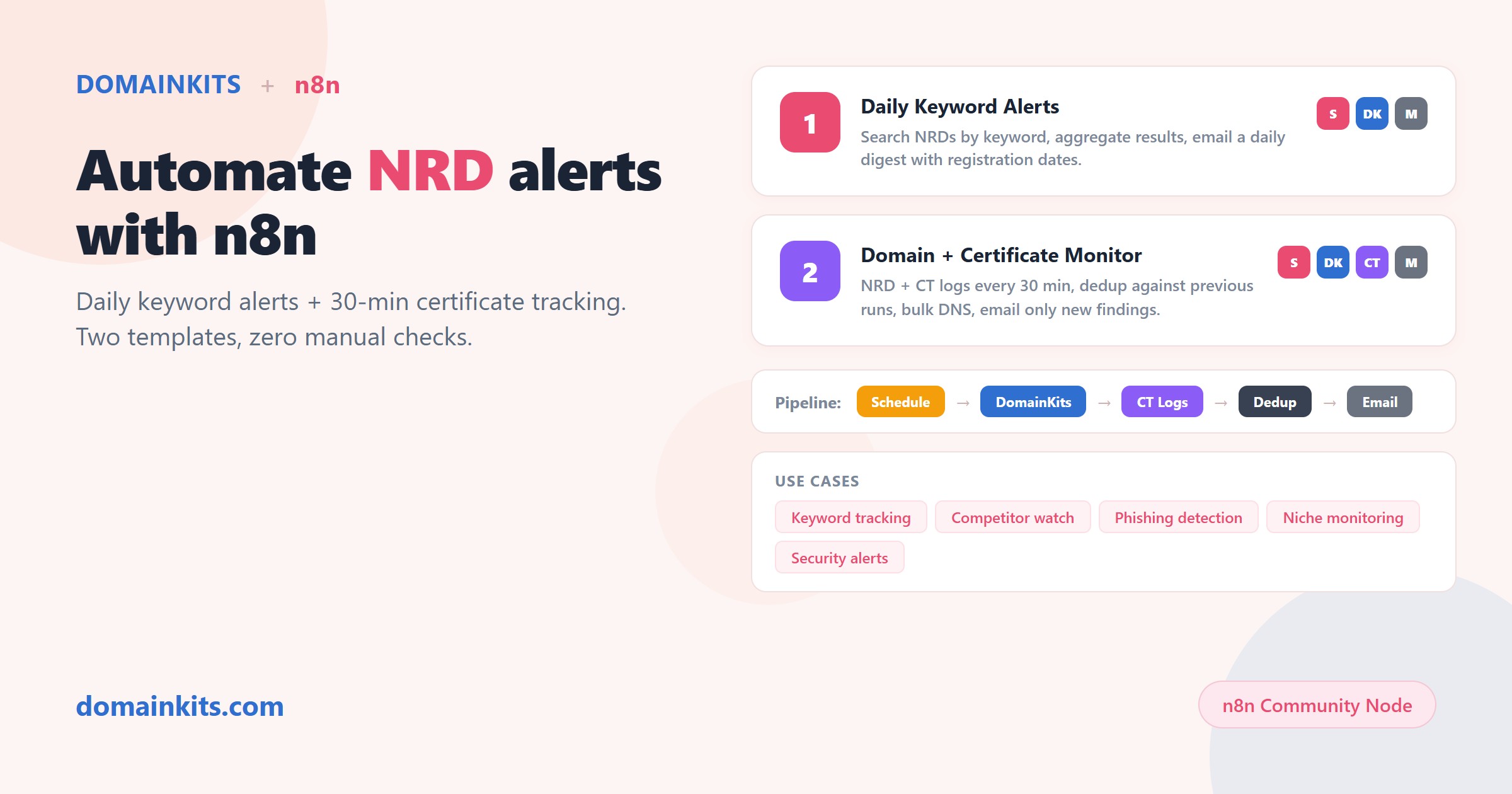
Newly registered domain (NRD) monitoring turns that volume into a daily email. n8n, the open-source workflow automation platform, handles the scheduling and delivery. The DomainKits community node provides the data: over 16 million domains registered in the past 60 days across 1,200+ gTLD extensions, updated daily, searchable by keyword, TLD, length, character type, registration period, and for-sale status.
Below are two workflow templates, published on the n8n template library. One runs daily for simple keyword tracking. The other runs every 30 minutes and correlates registrations with Certificate Transparency logs.
What are newly registered domains?
Newly registered domains (NRDs) are domain names registered within a recent window, typically 1 to 60 days. The DomainKits NRD dataset indexes every gTLD registration as it appears in the zone files and WHOIS streams, covering 1,200+ extensions from .com and .net to .ai, .app, and .xyz.
Registration is the first observable event in a domain's lifecycle. Before a domain resolves, before it has content, before search engines index it, it gets registered. Monitoring NRDs means catching signals at the earliest possible point.
What can you do with NRD data?
The same dataset serves different purposes depending on the lens:
- Keyword tracking. Watch domains containing a specific word. The 7,110 "agent" registrations in 10 days include domains like agenticaiyou.com, omnipresentagent.com, and a cluster of *agentpay.com variants. Each registration is a signal of where builders and speculators think the market is heading.
- Brand protection. When the keyword is your brand name, those 3,065 results become a threat assessment. A new domain combining your product name with "login," "verify," or "secure" registered yesterday on a privacy-shielded registrar is worth investigating before it goes live. Brand monitoring is the most security-sensitive NRD use case, and we cover it in depth in Automate Brand Domain Monitoring with n8n, which adds typosquat scanning on top of keyword alerts.
- Security intelligence. Security teams monitor NRDs for domains that mimic login pages or internal tools. Combined with Certificate Transparency data (Workflow 2 below), NRD monitoring catches phishing infrastructure during setup.
- Market research. A spike in registrations around a keyword can signal market interest before it shows up in search trends. Filter by registration period: one-year registrations are typically speculative, while multi-year registrations suggest commitment.
- Competitive intelligence. When a competitor registers multiple domains around a new product name, the registrations appear in NRD data days or weeks before any public announcement.
Prerequisites
- An n8n instance. Self-hosted or n8n Cloud, any version that supports community nodes (v2.31+).
- The DomainKits node. Install from Settings → Community Nodes → search for
n8n-nodes-domainkits. Self-hosted:npm install n8n-nodes-domainkits. - A DomainKits API key. API access requires a Premium or higher plan. Generate your key at domainkits.com/dev.
- SMTP credentials. Both templates deliver results via email.
Workflow 1: Daily keyword registration alerts
What it does: Searches for newly registered domains containing your keyword and emails you the results every day.
How it works:
- A schedule trigger fires once daily after 12:00 UTC, when registration data for the previous day is complete.
- The DomainKits NRD node queries for domains registered two days ago that contain your keyword.
- All returned records are aggregated into a single list.
- A code node builds a plain-text email listing each domain with its registration and expiry dates.
- The email node sends the alert via SMTP.
What makes this different from a generic NRD feed: The DomainKits NRD API returns structured data, not just domain names. Each result includes the registration date, expiry date, registration period (1 year vs. multi-year), cross-TLD count (how many extensions the same prefix is registered on), and for-sale status. The cross-TLD count is particularly useful: a domain like xarranicloud.com registered on 3 TLDs simultaneously is a different signal than one registered on a single extension.
Setup: Replace the placeholder keyword (yourkeyword) with your search term, configure SMTP, and activate.
Import this template on n8n.io
Workflow 2: Domain and certificate activity monitor
A domain registered yesterday is a data point. A domain registered yesterday that already has an SSL certificate is an active deployment. This workflow catches that distinction.
What it does: Tracks your keyword across both newly registered domains and Certificate Transparency logs, deduplicates against previous runs, and alerts you only on new activity.
How it works:
- A schedule trigger fires every 30 minutes.
- The DomainKits NRD node queries for recently registered domains matching your keyword.
- Simultaneously, the Certificate Transparency search node checks CT logs for hostnames containing the keyword.
- Both datasets are compared against stored state from the previous run, surfacing only new entries.
- New domains (up to 20 per batch) go through bulk DNS lookups.
- An email with the new findings and a CSV attachment is sent.
Why CT correlation matters: Consider those 3,065 "pay" domains registered in 10 days on .com alone. Most of them are parked, speculative, or abandoned within weeks. But the ones that obtain SSL certificates within 24 hours of registration are being actively deployed. Of those 3,065 domains, the ones that show up in both the NRD feed and CT logs are the highest-priority signals, because they represent registrations that immediately moved to infrastructure setup. This workflow surfaces that intersection automatically.
Setup: Set the watch keyword and optional exclusion suffixes. Run the workflow once manually to establish the baseline state. After that, the 30-minute schedule handles everything.
Import this template on n8n.io
Which workflow should you pick?
If you need a daily digest of new registrations matching a keyword, Workflow 1 is the right starting point. It runs once a day, produces a clean list, and requires no ongoing maintenance.
If you need to catch activity faster, or if you care about the difference between a registered domain and a deployed domain, Workflow 2 adds Certificate Transparency correlation and 30-minute polling.
Both workflows can run in parallel on the same n8n instance with different keywords. A common pattern: run Workflow 1 for broad industry keywords (daily volume is manageable), and run Workflow 2 for your exact brand name (where speed matters and volume is low).
If your primary concern is brand protection, not just keyword tracking, see Automate Brand Domain Monitoring with n8n. That article covers a workflow that extends NRD keyword monitoring with typosquat variant scanning, catching lookalike domains that a keyword search alone would miss.
Extending these workflows
The DomainKits node exposes every NRD API parameter, so you can customize these templates:
- TLD filtering. The 7,110 "agent" results span hundreds of TLDs. Filter to .com only and the number drops to a manageable daily list. Or filter to a specific extension to watch activity on one TLD.
- Length and type filters. Filter to pure alphabetic domains under 5 characters to focus on high-value short names. Filter out numbers and hyphens to remove low-quality registrations.
- For-sale filtering. Add a for-sale flag to see which NRDs are already listed on marketplaces, separating speculative inventory from intent-to-build registrations.
- Registration period. A 1-year registration is cheap and often speculative. A 6+ year registration signals commitment. This filter is unique to the DomainKits NRD dataset.
- Output routing. Replace the email node with Slack, Discord, Google Sheets, or any other n8n integration.
Get started
Install the node, import a template, set your keyword, and activate. The first alert arrives on the next scheduled run.
Related reading: Automate Brand Domain Monitoring with n8n extends NRD monitoring with typosquat scanning for brand protection. Automate Expired Domain Hunting with n8n covers expired domain prospecting with Moz enrichment.